PTZ cameras demand more than “it turns on.” They often draw higher PoE power than standard fixed cameras, and they need stable, low-latency networking for smooth pan, tilt, and zoom. Generic switch rankings miss the real risks: insufficient wattage, the wrong PoE standard, or a network that lacks QoS or VLAN controls. This matters most when multiple cameras share a single switch or when long cable runs introduce performance drop-offs and intermittent disconnects.
Use this to narrow your options by requirements and tradeoffs. We connect PoE power budget and PoE port type to how PTZs typically start up, then match switch features like QoS, VLAN, and IGMP snooping to your camera and NVR setup. You’ll also see what distance-extension modes do to speed, so the specs don’t surprise you after install.
List of Poe Switch For Ptz Camera
PoE switches for PTZ cameras must reliably deliver the right watts to the right ports and keep video traffic moving. A reader-first review therefore centers on practical deployment scenarios, not marketing checklists. Each product explanation translates features into what the camera installation actually experiences, such as dynamic power allocation during startup, fanless noise benefits, or extend modes that lower bandwidth. The decision map groups buyers by their highest-risk requirement: power headroom, number of cameras, long cable runs, or the need for easy management. A verification checklist then tells you exactly what to confirm on listings, firmware, and your cabling.
Product-by-product explanation
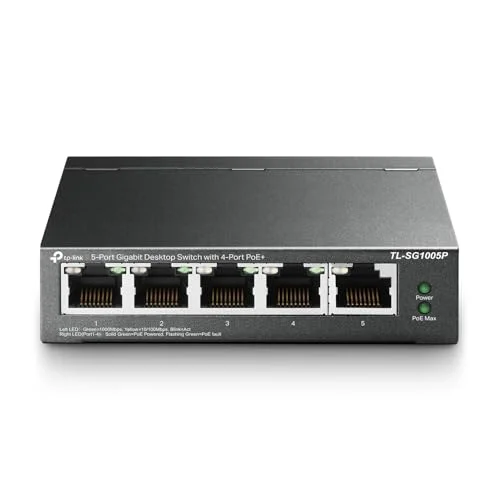
This TP-Link 5-port switch is aimed at steady PoE delivery for a small PTZ setup. Four gigabit RJ45 ports provide PoE+ power with a 65W total pool, and the separate gigabit non-PoE uplink helps keep your NVR traffic running fast. QoS-style prioritization plus IGMP snooping are helpful when multiple cameras share bandwidth and you want video to arrive predictably. The fanless metal design also fits places where noise and durability matter. Plug-and-play operation reduces setup complexity for installers who don’t want to configure networking before cameras go live.
Best for: Home or small-business PTZ setups using up to four PoE+ cameras when stable traffic matters more than deep network control.
Not ideal for: PTZ models that need PoE++ (BT 90W) or multi-camera systems that exceed 65W total PoE during simultaneous activity.
Decision cue: I would shortlist it when PoE+ is sufficient and you want a quiet five-port switch for PTZ cameras plus a fast uplink.
Check Amazon
This NETGEAR GS305P focuses on the “it just works” side of PoE. It gives five gigabit ports, with four providing PoE+ power for a 63W total budget. Because it’s unmanaged, there’s no VLAN planning or configuration page to manage, which can cut down setup mistakes. Dynamic PoE allocation can also help when devices draw more at startup, since unused power may be redistributed to other ports. The fanless metal enclosure keeps it quiet, which makes it easier to place in living spaces or light commercial areas.
Best for: Buyers who want the simplest possible PoE+ switch for one to four PTZ cameras, with reliable basic networking.
Not ideal for: Installations that need VLAN separation, QoS control, or IGMP handling to keep video stable under heavier network congestion.
Decision cue: Skip it if your PTZ bitrate, LAN contention, or camera requirements call for managed traffic features.
Check Amazon
This TP-Link 8-port PoE+ switch gives you more expansion for PTZ-style deployments while still covering the most common camera power needs. It includes eight gigabit PoE+ capable ports with a 65W total power budget for PoE+ (802.3at/af) devices, which suits smaller-to-medium surveillance blocks. Extend Mode is the key “why” here, it can push PoE further for surveillance camera cabling in longer runs, but the tradeoff is reduced speed on extended links. PoE Auto Recovery is another practical safety net, restarting a dropped or unresponsive PoE device so cameras don’t stay offline until someone checks them in person.
Best for: Medium camera counts up to eight when PoE+ suffices, plus occasional longer cabling that needs Extend Mode.
Not ideal for: PoE++ (BT) PTZ cameras that require 90W-class power, or systems that need more than 65W total during active periods.
Decision cue: Shortlist it when you want extra ports and recovery for dropped cameras, and you can accept a speed downgrade on any extended runs.
Check Amazon
This LINOVISION switch is built for higher-watt PTZ setups by mixing PoE++ BT on multiple ports with PoE+ on the rest. Ports 1-4 support BT 90W, and the total PoE budget is rated at 120W, giving you enough headroom for PTZ cameras and other higher-demand PoE devices from a single box. It also uses both gigabit RJ45 and an SFP uplink, which helps when the NVR or core network needs to be reached over a different link type. PoE safety behavior (PD detection and classification negotiation) is designed to deliver the right power profile to IEEE 802.3af/at/bt devices without overloading.
Best for: Deployments with high-watt PTZ cameras that need PoE++ (BT) plus mixed device types on the same switch.
Not ideal for: Installations that only need PoE+ and want to avoid the extra cost of BT-capable hardware.
Decision cue: I would choose it when at least one PTZ model demands BT 90W-class PoE and you need enough total power for multiple cameras.
Check Amazon
This NETGEAR Easy Smart Managed switch gives you a middle ground: more control than unmanaged, without the complexity of enterprise switching. It provides eight gigabit ports with eight PoE+ ports and a 62W total budget, often enough for a mid-sized mix of PTZ and fixed cameras when they’re not all drawing peak power at the exact same moment. Managed features matter for PTZ installs because VLAN and QoS can help keep video traffic consistent and prevent other LAN usage from causing jitter or interruptions. It also includes per-port PoE controls, which makes maintenance easier since you can restart a single troublesome camera instead of affecting every device on the switch.
Best for: Small business or multi-camera homes that want PoE+ plus light management like VLAN, QoS, and per-port power control.
Not ideal for: PoE++ (BT) PTZ cameras requiring higher wattage per port.
Decision cue: Shortlist it when you want managed VLAN/QoS and per-port PoE control for up to eight PoE+ cameras.
Check Amazon
This LINOVISION industrial switch is aimed at reliability when PTZ installs are harder on hardware. It includes four BT 90W PoE++ ports and four PoE+ ports, with a 120W total power budget, so it can handle higher-watt PTZ camera requirements better than typical PoE+ models. The industrial focus isn’t just marketing: it includes a PoE watchdog that monitors connected device status and can automatically reboot a port when a camera stops responding. It also supports more robust site power expectations, including redundant DC power inputs, which can reduce downtime if a power feed becomes unreliable. With gigabit RJ45 plus uplink options, it’s built for real-world install constraints.
Best for: Warehouse, outdoor, or industrial PTZ installs that need PoE++ power, watchdog-style recovery, and redundant power support.
Not ideal for: Standard indoor setups where a simpler PoE+ switch would be cheaper and sufficient.
Decision cue: Choose it when power continuity and high-watt PTZ support matter more than cost, and the site conditions justify industrial hardware.
Check Amazon
This Goalake 5-port style option targets compact PTZ deployments while still keeping some management capability. It offers four PoE+ ports and a gigabit uplink, so you can power a small camera group and keep the network adjustable through its management interface. VLAN support and QoS-style tools help prioritize camera traffic, which matters when your LAN also handles computers, Wi-Fi backhauls, or other busy networking. Extend capabilities can help with longer cabling runs, though extended operation may trade away speed depending on configuration. Because it’s manageable, troubleshooting and maintenance can be faster than with purely unmanaged switches.
Best for: Buyers who want a small managed PoE switch for PTZ cameras and prefer visibility and VLAN/QoS options.
Not ideal for: Users who want the simplest possible unmanaged setup, or anyone relying on PoE behavior for non-PoE devices without verifying compatibility first.
Decision cue: Shortlist it when you need compact size plus VLAN/QoS and remote management options for a small PTZ camera set.
Check Amazon
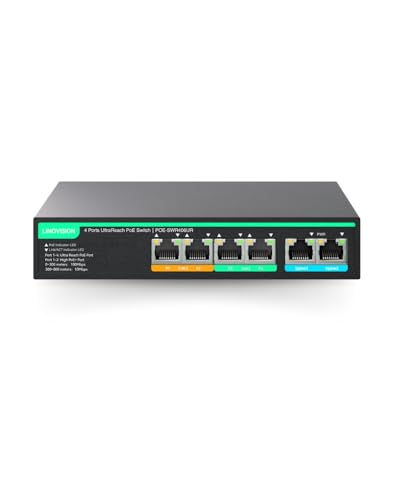
This LINOVISION UltraReach switch focuses on the distance problem in PTZ installs. Instead of only optimizing for maximum gigabit, it’s designed to extend PoE and data significantly farther (using UltraReach), which can help prevent costly rewiring when cameras need to sit far apart. It includes gigabit-compatible uplink support and a built-in 65W power supply for standalone surveillance segments. The first two ports provide higher PoE+ output, which can be useful for power-hungry PTZ units. It also supports remote management features, which can make monitoring multiple far-flung cameras easier.
Best for: Projects where PTZ camera locations force very long cable distances and you want a managed, distance-focused PoE solution.
Not ideal for: High-throughput PTZ recording that requires full gigabit performance across the extended links.
Decision cue: Choose it when normal gigabit PoE wiring distances aren’t practical and the reduced extended-link performance still meets your camera bitrate needs.
Check Amazon
This TP-Link TL-SF1005P is a compact five-port PoE switch for smaller surveillance networks with limited port needs. It includes four PoE+ ports that deliver up to 67W total PoE power, while the fifth port is non-PoE for connecting to your NVR or uplink. It’s plug-and-play, and it includes PoE Auto Recovery to help when a PTZ camera drops offline and needs a reboot to come back. Extend Mode supports medium extended runs (around 250 meters), but it does downgrade speed, so video quality can depend on your camera’s bitrate and your NVR settings on those longer links.
Best for: Small PTZ installations needing PoE+ with quiet operation, compact placement, and short-to-medium extended runs.
Not ideal for: Long cable runs that need hundreds of meters of extension, or PTZ models requiring PoE++ BT power.
Decision cue: I would shortlist it when you want an affordable, fanless PoE+ switch with Extend and auto recovery for up to four PTZ cameras.
Check Amazon
Reader questions answered
How much PoE power do PTZ cameras need, and how do switch budgets affect reliability?
PTZ reliability comes down to power stability and network behavior, not just “the camera powers on.” Start by checking the camera’s required PoE standard (802.3af, 802.3at, or 802.3bt) and its watt draw during PTZ movement. Then compare that to the switch’s per-port limits and total PoE budget, especially if more than one PTZ shares the same switch. Some switches can help when a camera freezes: dynamic power allocation and Auto Recovery features may reduce downtime. Still, if you oversubscribe the power budget, you can get repeated resets or intermittent disconnects.
Which switch features help keep PTZ video stable when the network gets busy?
PTZ video streams can get unstable when the LAN doesn’t prioritize video traffic or when multicast handling is off. QoS can reduce jitter for live video, while VLAN separation helps prevent accidental mixing with office devices. IGMP snooping can help with multicast camera traffic when paired with a compatible NVR. If your network stays quiet and simple, unmanaged switches may work, but they don’t provide tools to correct congestion. Managed “easy” models can deliver enough control for small installs without the learning curve of enterprise gear.
Do I need a managed switch, or will plug-and-play unmanaged work for PTZ?
Unmanaged switches can power PTZ cameras successfully when the LAN is simple, cabling is clean, and the number of devices stays low. But PTZ installs often benefit from quicker recovery when a camera freezes or drops offline. Managed switches add tools like per-port PoE control, VLAN/QoS features, and monitoring that can reduce onsite visits. If your camera system shares a LAN with other traffic or includes multiple device types, those controls can prevent interruptions. If cost and simplicity matter most, unmanaged is still viable, just recognize the troubleshooting tradeoff.
Can I run PTZ cameras far from the switch, and what does “extend mode” cost?
Distance extension changes the performance profile. Many long-range PoE solutions lower link speed on extended ports, and that can affect PTZ video bitrate and recording smoothness. Some solutions also require proprietary remote-side hardware, so you’ll want to confirm that the far end includes what’s needed. Before buying, map your cable length, camera bitrate, and whether your NVR supports the resulting throughput. Extend modes can still be the right answer when trenching or new cable pulls aren’t practical, but they typically limit how many cameras can share an extended segment reliably.
Which switch is safest for environments where cameras or power can be unreliable?
When PTZ cameras operate in locations with frequent disconnects, the switch needs recovery features. PoE Auto Recovery and watchdog-style rebooting reduce time to restore a frozen PTZ camera without climbing ladders or visiting the site. Redundant power input matters when the biggest risk is a failing power feed, not just the camera. Industrial switches also often consider harsher operating conditions. If downtime is expensive, these features can beat switches that only look good on paper. Still, verify your site’s voltage range, grounding/installation requirements, and physical mounting constraints.
What the comparison teaches
Power budgets decide whether PTZ motion stays stable.
Always calculate against peak movement behavior and the switch’s total PoE wattage. PoE+ and PoE++ cameras differ, so matching the PoE standard helps avoid “it turns on” failures.
Traffic priorities matter more than port count in busy networks.
QoS and IGMP snooping can reduce jitter and dropped frames when other devices share the LAN. If the network stays quiet, unmanaged can work, but troubleshooting becomes slower and less predictable.
Extend Mode trades distance for throughput.
Long-range PoE solutions commonly lower speed on extended ports. Match your PTZ bitrate and NVR recording settings to the reduced link capacity.
Recovery features cut downtime, but they cannot fix undersized power.
Auto Recovery and PoE watchdogs help with camera freezes or dropouts, but they can’t fix a consistently undersized PoE power budget.
Before you buy
- Confirm each PTZ camera’s required PoE standard and its watt draw, then compare those needs to both per-port limits and the switch’s total PoE budget (especially for simultaneous movement).
- If your PTZ requires PoE++ (802.3bt), verify the switch model supports BT 90W-class output on the correct ports, not just “supports BT” in general.
- Verify your NVR and cabling plan: make sure the uplink speed and port type match the recording requirements and that your cable category supports gigabit.
- If you plan to use Extend Mode, confirm the maximum distance for your exact switch model, what remote hardware is required on the far end, and how much speed downgrade to expect.
- Check how the switch handles your camera traffic style (unicast vs multicast) and whether IGMP snooping is likely to help your NVR setup.
- Confirm installation constraints: mounting style, expected environment (indoor vs industrial), and any notes about fanless operation, shielding, or power input.
- Re-check warranty terms and recent user feedback for PTZ-related symptoms like repeated reboots, dropped ports, or PoE negotiation quirks.
Final takeaway
The best poe switch for PTZ cameras comes down to power headroom, PoE standard compatibility, and how the switch treats video traffic. For small PoE+ PTZ groups, a fanless switch can work well when its total watt budget covers peak movement. For mixed installs or busier networks, QoS, IGMP snooping, VLAN support, and per-port PoE controls reduce interruptions and make recovery faster. When distance drives the design, extend modes help you get the cabling done, but they usually reduce throughput. For high-power PoE++ PTZ systems or mission-critical sites, industrial switches with watchdog recovery and redundant power provide the most dependable uptime.
FAQ
Do PTZ cameras always need PoE+, or can PoE work?
Some PTZ models use PoE (802.3af), but many require PoE+ (802.3at) or even PoE++ (802.3bt) because motors, heaters, and auxiliary features can push power needs higher. Always confirm the camera’s required power requirement and watt draw on its datasheet, then match it to the switch’s per-port and total budgets.
What happens if the switch PoE budget is too low?
If power delivery isn’t stable, a PTZ may fail to power, repeatedly reboot, or drop during heavy movement. Power shortfalls can show up as intermittent disconnects rather than an immediate “no power” failure, especially when multiple cameras draw at the same time.
Is extend mode safe for PTZ video quality?
Extend mode can work for long runs, but it often reduces link speed on the extended port. Video quality depends on your camera bitrate and how your NVR is set, so it’s smart to validate that the reduced throughput still supports smooth live view and recording.
Should surveillance networks use VLAN and QoS on the switch?
VLAN and QoS matter most when the camera network shares bandwidth with other devices. QoS helps keep camera traffic prioritized, while VLAN separation reduces accidental LAN mixing that can interfere with surveillance streams.
How do auto recovery features help with frozen PTZ cameras?
PoE Auto Recovery or PoE watchdog features can reboot a non-responsive camera port. That can restore operation without manual intervention, but it can’t correct underlying cable faults or a PoE budget that’s consistently too small for the camera load.